
Writing assignments have become more demanding than ever. From essays and research papers to scholarship applications and discussion posts, students are expected to produce clear, well-structured, and original work while managing multiple deadlines.
Fortunately, modern AI writing tools can help students work more efficiently. The best platforms go beyond fixing grammar—they help organize ideas, improve sentence structure, explain difficult concepts, summarize research, and strengthen academic writing without replacing critical thinking.
However, not every AI writing assistant is worth using. Some excel at brainstorming, while others specialize in proofreading, paraphrasing, or academic editing. Choosing the right tool depends on your writing style, subject, and educational level.
In this guide, we’ll compare the Best AI Writing Tools for Students, explain their strengths and weaknesses, and help you decide which one fits your academic needs.
For a complete comparison of AI software across every category, read our guide to Best AI Tools for Students.
If you’re looking for tools that cost nothing to use, check out our guide to Best Free AI Tools for Students.
Table of Contents
- What Are AI Writing Tools?
- How We Evaluated These Tools
- Quick Comparison Table
- Best AI Writing Tools for Students
- ChatGPT
- Claude
- Grammarly
- QuillBot
- Google Gemini
- Free vs Paid AI Writing Tools
- Expert Tips
- Common Mistakes
- FAQs
- Conclusion
What Are AI Writing Tools?
AI writing tools help students brainstorm ideas, improve grammar, organize essays, rewrite sentences, summarize information, and refine academic writing. The best tools assist with learning and editing instead of simply generating complete assignments.
Today’s AI writing software can support nearly every stage of the writing process, including:
- Brainstorming essay ideas
- Creating outlines
- Improving grammar
- Rewriting awkward sentences
- Summarizing research
- Checking clarity
- Explaining difficult concepts
- Improving readability
Instead of replacing your own writing, these tools work best as assistants that help you express your ideas more clearly.
How We Evaluated These AI Writing Tools
Our recommendations focus on real student value rather than marketing claims. Every tool was assessed based on writing quality, ease of use, editing capabilities, academic usefulness, pricing, and overall learning experience.
We considered:
| Evaluation Factor | Why It Matters |
|---|---|
| Writing Quality | Produces natural, readable content |
| Grammar Accuracy | Reduces writing mistakes |
| Academic Support | Helpful for essays and assignments |
| Ease of Use | Simple enough for beginners |
| Free Plan | Useful without paying |
| Editing Features | Improves clarity and structure |
| Overall Value | Worth using for long-term study |
Quick Comparison Table
| Tool | Best For | Free Plan | Overall Rating |
|---|---|---|---|
| ChatGPT | Essay drafting & brainstorming | ✅ | ⭐⭐⭐⭐⭐ |
| Claude | Academic writing & long documents | ✅ | ⭐⭐⭐⭐⭐ |
| Grammarly | Grammar & proofreading | ✅ | ⭐⭐⭐⭐☆ |
| QuillBot | Paraphrasing & rewriting | ✅ | ⭐⭐⭐⭐☆ |
| Google Gemini | Google Docs writing | ✅ | ⭐⭐⭐⭐☆ |
| Microsoft Copilot | Productivity & writing | ✅ | ⭐⭐⭐⭐☆ |
| Notion AI | Writing and note organization | Limited | ⭐⭐⭐⭐☆ |
Best AI Writing Tools for Students
The best AI writing tools don’t simply write essays—they help students improve their own writing skills. The platforms below stand out because they provide meaningful assistance throughout the writing process.
ChatGPT
Overview
Developed by OpenAI, ChatGPT is one of the most versatile AI writing assistants available today. It can help students brainstorm ideas, generate outlines, explain topics, improve paragraphs, rewrite confusing text, and prepare for writing assignments.
Rather than replacing your work, ChatGPT is most valuable when used as an interactive writing coach.
Key Features
- Essay brainstorming
- Outline generation
- Paragraph rewriting
- Writing feedback
- Grammar improvement
- Study planning
- Research summaries
- Practice questions
Best For
- Essay planning
- Homework writing
- College assignments
- Personal statements
- Scholarship essays
- Creative writing
Pricing
- Free plan available
- Premium subscription available with additional features and higher usage limits
Free Plan Details
The free version offers enough functionality for most students completing everyday assignments.
Advantages
- Excellent natural writing
- Easy to understand
- Supports multiple subjects
- Helpful brainstorming
- Great for improving weak drafts
Limitations
- AI-generated citations may be inaccurate
- Facts should always be verified
- Doesn’t replace academic research
Real Student Use Cases
Students commonly use ChatGPT to:
- Create essay outlines
- Improve introductions
- Rewrite paragraphs
- Generate thesis statements
- Practice writing styles
- Prepare discussion posts
When Should You Choose ChatGPT?
Choose ChatGPT if you need an all-purpose AI writing assistant capable of helping throughout every stage of the writing process.
Claude
Overview
Created by Anthropic, Claude has become one of the strongest AI writing tools for students working with long documents. It excels at editing essays, summarizing PDFs, reviewing research papers, and providing thoughtful writing suggestions.
Many university students prefer Claude because it handles large amounts of text exceptionally well.
Key Features
- Long-document analysis
- Essay editing
- Writing feedback
- PDF summarization
- Academic explanations
- Literature review assistance
Best For

- University students
- Research papers
- Literature reviews
- Thesis preparation
- Long-form academic writing
Pricing
- Free version available
- Paid subscription offers expanded usage
Free Plan Details
Most students can comfortably use Claude’s free version for essays and editing.
Advantages
- Excellent long-form writing
- Detailed explanations
- High-quality editing
- Strong document analysis
Limitations
- Usage limits apply
- Citations should still be verified
- Less focused on quick brainstorming than ChatGPT
Real Student Use Cases
Students use Claude to:
- Edit research papers
- Review journal articles
- Improve essay structure
- Summarize lengthy readings
- Rewrite unclear sections
When Should You Choose Claude?
Choose Claude if your assignments involve large PDFs, academic research, or long essays requiring detailed feedback.
Grammarly AI
Overview
Grammarly has evolved from a grammar checker into an AI-powered writing assistant. While its primary focus remains proofreading and editing, it also helps improve clarity, tone, sentence flow, and overall readability.
Unlike conversational AI platforms, Grammarly specializes in polishing content you’ve already written.
Key Features
- Grammar correction
- Spelling checks
- Tone suggestions
- Clarity improvements
- Style recommendations
- Writing feedback
Best For
- Final proofreading
- Academic editing
- Scholarship applications
- Professional emails
- Assignment reviews
Pricing
- Free version available
- Premium subscription unlocks advanced writing features
Free Plan Details
Students receive grammar and spelling corrections without paying.
Advantages
- Extremely accurate grammar checking
- Works inside browsers and Microsoft Word
- Fast proofreading
- Beginner-friendly
Limitations
- Doesn’t perform academic research
- Limited AI writing assistance in the free version
- Advanced suggestions require Premium
Real Student Use Cases
Students regularly use Grammarly to:
- Proofread essays
- Improve reports
- Edit scholarship essays
- Review emails to professors
- Polish final drafts
When Should You Choose Grammarly?
Choose Grammarly after completing your draft. It serves as the final editing step before submission.
QuillBot AI
Overview
QuillBot focuses on rewriting and paraphrasing text while preserving its original meaning. It helps students improve readability, eliminate repetitive wording, and simplify complex sentences.
It should be used to improve writing—not to disguise copied work.
Key Features
- AI paraphrasing
- Summarization
- Grammar checking
- Sentence rewriting
- Vocabulary improvements
Best For
- Rewriting paragraphs
- Improving readability
- Editing assignments
- Summarizing articles
Pricing
- Free version available
- Premium subscription expands writing modes and usage limits
Free Plan Details
Students can access basic paraphrasing and summarization features without paying.
Advantages
- Excellent rewriting tool
- Multiple writing styles
- Simple interface
- Saves editing time
Limitations
- May occasionally change sentence meaning
- Requires manual review
- Not designed for research
Real Student Use Cases
Students use QuillBot to:
- Improve rough drafts
- Rewrite repetitive paragraphs
- Simplify difficult writing
- Summarize articles
- Improve readability
When Should You Choose QuillBot?
Choose QuillBot when your draft needs smoother wording rather than new ideas.
Google Gemini
Overview
Google Gemini combines AI writing assistance with Google’s productivity ecosystem. Students using Google Docs, Google Drive, and Google Workspace benefit from seamless writing support while working on assignments.
Its integration with familiar Google services makes it especially attractive for collaborative projects.
Key Features
- Writing assistance
- Brainstorming
- Document summaries
- Google Workspace integration
- Assignment organization
Best For
- Google Docs users
- Group projects
- Essay drafting
- Productivity
- Homework writing
Pricing
- Free version available
- Premium plans include expanded AI capabilities
Free Plan Details
The free version provides enough functionality for most writing and productivity tasks.
Advantages
- Excellent Google integration
- Easy to use
- Strong productivity features
- Helpful brainstorming
Limitations
- Research should still be verified
- Advanced AI features require premium access
Real Student Use Cases
Students commonly use Gemini to:
- Draft essays
- Brainstorm ideas
- Summarize Google Docs
- Organize writing projects
- Improve assignment structure
When Should You Choose Google Gemini?
Gemini is an excellent choice if you already rely on Google Workspace for your coursework.
Microsoft Copilot Writing
Overview
Developed by Microsoft, Copilot is an AI writing assistant that integrates with Microsoft 365 applications such as Word, PowerPoint, and Outlook. It helps students draft essays, rewrite paragraphs, organize ideas, and improve writing without leaving the Microsoft ecosystem.
Students who already use Microsoft Word for assignments will find Copilot particularly convenient because it works directly within familiar applications.
Key Features
- Essay drafting
- Paragraph rewriting
- Writing suggestions
- Grammar improvements
- Document summarization
- Microsoft 365 integration
Best For
- Microsoft Word users
- Homework writing
- College assignments
- Group projects
- Productivity
Pricing
- Free version available
- Premium Microsoft 365 plans unlock additional AI capabilities
Free Plan Details
Students can access core AI writing features for everyday writing tasks, while advanced integrations require a subscription.
Advantages
- Excellent Microsoft integration
- Easy to learn
- Helpful writing suggestions
- Good productivity features
Limitations
- Best experience requires Microsoft services
- Not as research-focused as ChatGPT or Claude
Real Student Use Cases
Students use Microsoft Copilot to:
- Draft reports
- Improve essays
- Rewrite assignments
- Create presentation content
- Organize writing projects
When Should You Choose Microsoft Copilot?
Choose Microsoft Copilot if you complete most of your assignments in Microsoft Word or other Microsoft 365 applications.
Notion AI
Overview
Notion AI combines note-taking, project management, and AI writing into a single workspace. Students can draft essays, summarize lecture notes, create study plans, and organize coursework without switching between multiple apps.
Key Features
- AI writing assistance
- Note summarization
- Assignment planning
- Brainstorming
- Task management
- Course organization
Best For
- Organizing coursework
- Long-term projects
- Research planning
- Study management
Pricing
- Limited AI features are available with free access.
- Additional AI functionality requires a paid plan.
Free Plan Details
Students can explore basic workspace features before upgrading for more advanced AI capabilities.
Advantages
- Excellent organization
- Clean interface
- Combines writing and productivity
- Great for semester planning
Limitations
- Initial setup takes time
- Advanced AI features require payment
Real Student Use Cases
Students use Notion AI to:
- Organize assignments
- Create study schedules
- Draft reports
- Summarize lecture notes
- Track deadlines
When Should You Choose Notion AI?
Choose Notion AI if you want both an AI writing assistant and a complete academic organization system.
Jasper AI
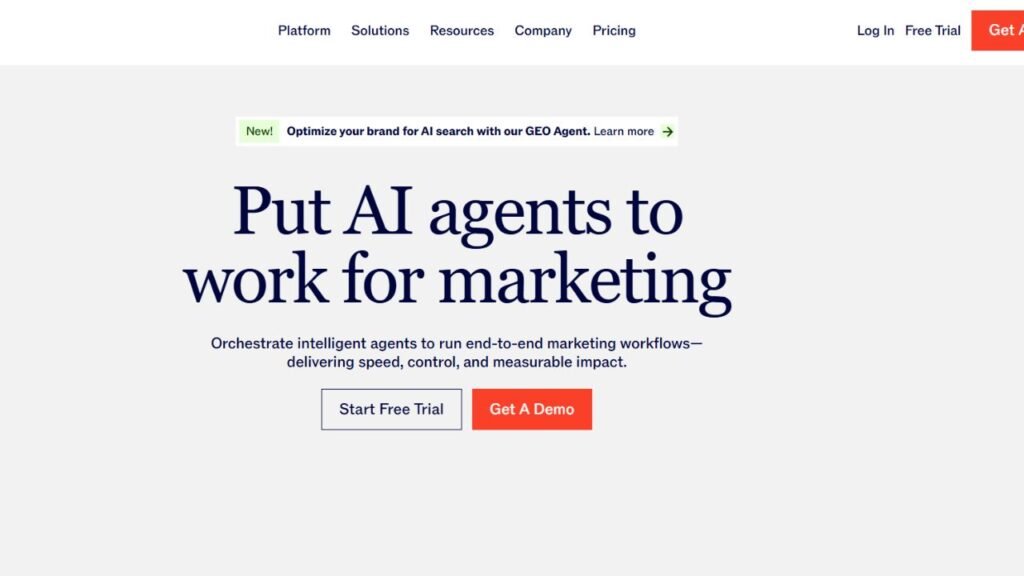
Overview
Jasper AI is primarily designed for professional content creation, but students working on marketing, communications, or business projects may find it useful for generating ideas and improving writing quality.
Key Features
- Long-form writing
- Marketing copy
- Content templates
- Tone adjustment
- Brainstorming
Best For
- Business students
- Marketing assignments
- Creative writing
- Content strategy projects
Pricing
Jasper AI operates as a premium service with a free trial available for new users.
Advantages
- High-quality writing
- Excellent templates
- Professional content generation
Limitations
- Not designed specifically for academic writing
- More expensive than most student-focused tools
Real Student Use Cases
Students use Jasper AI to:
- Draft marketing reports
- Brainstorm campaigns
- Improve business writing
- Create project content
When Should You Choose Jasper AI?
Choose Jasper AI if your coursework focuses on business, marketing, or professional content creation.
Writesonic
Overview
Writesonic is another AI writing platform focused on generating articles, blog posts, and marketing content. While it isn’t built specifically for education, students can use it to brainstorm ideas and structure longer writing projects.
Key Features
- AI article generation
- Writing templates
- Content rewriting
- Idea generation
Best For
- Creative assignments
- Business projects
- Marketing coursework
Pricing
Free access is available with usage limits, while premium plans unlock additional credits and advanced models.
Advantages
- Fast content generation
- Easy interface
- Helpful templates
Limitations
- Less focused on academic writing
- Generated content still requires editing
Real Student Use Cases
Students use Writesonic to:
- Brainstorm reports
- Generate outlines
- Improve content flow
- Create first drafts
Canva Magic Write
Overview
Canva Magic Write combines AI writing assistance with Canva’s design platform. Students can generate presentation content, social media copy, project descriptions, and creative writing directly within Canva.
Key Features
- AI writing
- Presentation content
- Brainstorming
- Design integration
Best For
- Presentation projects
- Classroom posters
- Creative assignments
Pricing
Canva includes limited AI writing features for free users, while premium plans provide expanded functionality.
Advantages
- Great for visual projects
- Easy to use
- Seamless Canva integration
Limitations
- Not designed for long academic papers
- Advanced AI features require Pro
LanguageTool
Overview
LanguageTool is an AI-powered grammar and style checker that supports multiple languages. It helps students improve grammar, punctuation, spelling, and writing clarity while offering suggestions that go beyond basic proofreading.
Key Features
- Grammar checking
- Style improvements
- Multilingual support
- Spelling correction
Best For
- Proofreading
- International students
- Academic editing
Pricing
Free version available with premium upgrades.
Advantages
- Supports many languages
- Accurate grammar checking
- Browser extensions available
Limitations
- Doesn’t generate essays
- Advanced suggestions require Premium
DeepL Write
Overview
DeepL Write focuses on rewriting and improving sentence quality. It helps students create more natural, professional, and readable writing while preserving their original meaning.
Key Features
- Sentence rewriting
- Style improvement
- Clarity enhancement
- Tone suggestions
Best For
- Editing essays
- Improving readability
- International students
Pricing
Free version available with optional paid upgrades.
Advantages
- Excellent sentence refinement
- Natural writing suggestions
- Easy to use
Limitations
- Limited research capabilities
- Doesn’t create complete assignments
Free vs Paid AI Writing Tools
| Feature | Free Plans | Paid Plans |
|---|---|---|
| Basic Writing Assistance | ✅ | ✅ |
| Grammar Checking | ✅ | ✅ |
| Essay Brainstorming | ✅ | ✅ |
| Higher Usage Limits | ❌ | ✅ |
| Advanced AI Models | ❌ | ✅ |
| Premium Templates | ❌ | ✅ |
| Priority Access | ❌ | ✅ |
| Advanced Editing | Limited | ✅ |
For most high school and college students, free plans are enough for everyday coursework. Premium subscriptions are usually worthwhile only if you write frequently, work with long documents, or need advanced editing features.
Which AI Writing Tool Is Best?
| Student Need | Best Tool |
|---|---|
| Essay Brainstorming | ChatGPT |
| Long Research Papers | Claude |
| Grammar & Proofreading | Grammarly |
| Paraphrasing | QuillBot |
| Google Docs Users | Google Gemini |
| Microsoft Word Users | Microsoft Copilot |
| Coursework Organization | Notion AI |
| Business Writing | Jasper AI |
| Marketing Projects | Writesonic |
| Presentation Content | Canva Magic Write |
| Grammar in Multiple Languages | LanguageTool |
| Sentence Improvement | DeepL Write |
Expert Tips for Using AI Writing Tools
AI writing assistants produce the best results when they’re treated as editors and study partners rather than essay generators.
Follow these best practices:
- Start with your own outline before asking AI for suggestions.
- Use AI to improve clarity instead of writing entire assignments.
- Verify every fact and citation independently.
- Compare responses from multiple AI tools for important assignments.
- Run your final draft through Grammarly or LanguageTool before submission.
- Rewrite AI-generated text in your own voice.
- Follow your school’s AI policy at all times.
- Proofread every assignment manually before submitting it.
Common Mistakes Students Make
Avoid these common errors when using AI writing software:
- Copying AI-generated essays without editing.
- Trusting AI-generated citations without verification.
- Depending on one writing tool for every assignment.
- Ignoring grammar after AI-generated writing.
- Forgetting to fact-check information.
- Violating academic integrity policies.
- Using AI to replace learning instead of supporting it.
- Submitting work without adding personal analysis.
Frequently Asked Questions
1. What is the best AI writing tool for students?
ChatGPT is the best overall AI writing tool because it combines brainstorming, drafting, editing, and learning assistance in one platform.
2. Which AI is best for essay writing?
Claude and ChatGPT are excellent for essay planning and drafting, while Grammarly is ideal for proofreading the final version.
3. Are AI writing tools free?
Many platforms, including ChatGPT, Claude, Grammarly, QuillBot, Google Gemini, and Microsoft Copilot, offer free plans with optional premium upgrades.
4. Can AI help improve my writing skills?
Yes. When used responsibly, AI can explain grammar, suggest stronger wording, improve structure, and provide feedback that helps students become better writers.
5. Which AI writing tool is best for college students?
College students often benefit from ChatGPT for brainstorming, Claude for long academic papers, and Grammarly for proofreading.
6. Is QuillBot better than Grammarly?
They serve different purposes. QuillBot focuses on paraphrasing and rewriting, while Grammarly specializes in grammar, spelling, and clarity.
7. Can AI write essays for homework?
AI can generate essays, but students should use it as a writing assistant rather than submitting AI-generated work as their own. Always follow your school’s academic integrity guidelines.
8. Which AI tool is best for grammar?
Grammarly remains one of the strongest grammar checkers, while LanguageTool is another excellent option, especially for multilingual users.
9. Do AI writing tools work on mobile devices?
Most leading AI writing tools offer web apps, mobile apps, or browser extensions, making them accessible across phones, tablets, and computers.
10. Should I pay for an AI writing tool?
Most students can complete everyday assignments using free plans. Paid subscriptions are most useful for heavy users who need advanced editing, larger usage limits, or premium AI features.
Conclusion
The Best AI Writing Tools for Students can make the writing process faster, more organized, and less stressful when used responsibly. Whether you’re drafting an essay, proofreading a report, summarizing research, or improving sentence clarity, there’s a tool designed for that task.
For all-around writing assistance, ChatGPT remains one of the strongest choices. Claude excels with long-form academic writing, Grammarly is ideal for proofreading, QuillBot simplifies rewriting, Google Gemini and Microsoft Copilot integrate well with productivity platforms, while Notion AI, Jasper AI, Writesonic, Canva Magic Write, LanguageTool, and DeepL Write each serve specific writing needs.
The most effective students don’t rely on AI to do their work for them. Instead, they use AI to organize ideas, improve drafts, strengthen arguments, and learn better writing habits. Combined with critical thinking, careful fact-checking, and your own original ideas, AI writing tools can become valuable partners throughout your academic journey.