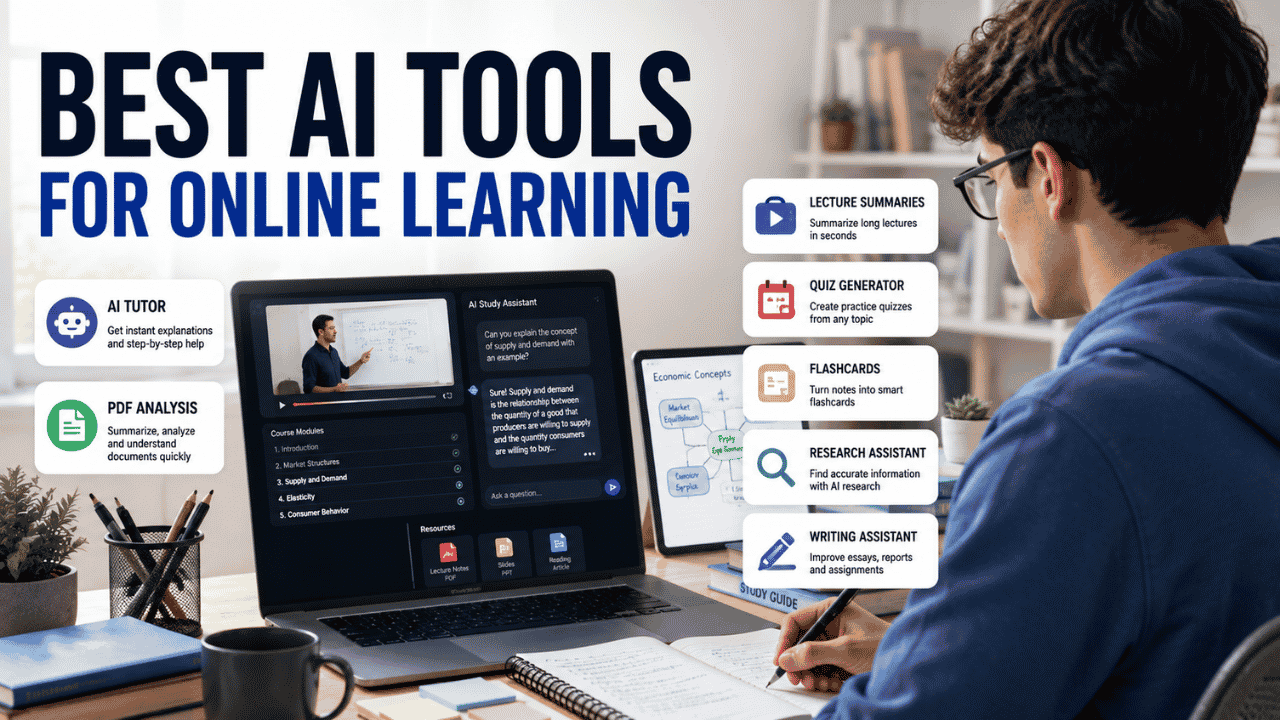
A typical online student might spend an hour watching a lecture, another hour reading course material, then realize they still have notes to organize and a quiz to prepare for. That is where the Best AI Tools for Online Learning can help. The useful ones do more than generate answers: they can explain difficult concepts, work with course materials, create practice questions, summarize long content, and help students study more actively.
The key is choosing the right tool for the task. NotebookLM is excellent for working directly with your own course sources, Khanmigo focuses heavily on guided learning, Quizlet is built around practice and recall, Perplexity is useful for research, while ChatGPT, Gemini, and Claude can handle broader study workflows.
Where Online Learning Gets Difficult
Online courses give students flexibility, but that flexibility can create its own problems.
A student can pause a lecture whenever they want. They can reread a chapter at midnight. They can watch a recording twice instead of asking a professor immediately.
That sounds convenient until five courses all have deadlines in the same week.
Long Lectures Are Hard to Process
A 90-minute lecture can contain only a handful of ideas that actually matter for the upcoming exam.
The problem is finding them.
Students often pause videos constantly to take notes, then end up with pages of notes that are difficult to review. AI can help summarize or organize material, but students should still return to the original lecture when a topic is unclear.
Too Much Reading
Online courses often combine:
- PDFs
- Textbooks
- Research papers
- Lecture slides
- Websites
- Discussion posts
- Assignments
- Instructor notes
Reading everything carefully is necessary for some courses, but AI can help students identify structure, key concepts, and sections that deserve closer attention.
No Immediate Help
In a physical classroom, a student can raise a hand.
Online, the instructor may not respond until later.
An AI learning assistant can provide an explanation immediately. That does not mean its answer is automatically correct, but it can be useful when a student is stuck on a basic concept at 11 p.m.
Online learners often need more than one type of AI tool to handle studying, research, writing, and exam preparation. If you want a broader overview before choosing tools for a specific online course, our guide to Best AI Tools for Students covers the main AI tools students can use across different areas of learning.
Difficult Concepts
Sometimes the problem is not the amount of material. It is the explanation.
A textbook might explain a statistical concept using technical terminology when the student needs a simple example first.
AI can explain the same idea at different levels:
“Explain this like I’m a beginner.”
Then:
“Give me a college-level explanation.”
Then:
“Give me a real-world example.”
That kind of back-and-forth can be useful for independent learners.
Multiple Deadlines
Online students may have assignments spread across several learning platforms.
Without a clear system, it becomes easy to focus on the easiest task rather than the most urgent one.
AI can help organize tasks, but the student still needs to decide what matters.
What AI Can Actually Help With
The Best AI Tools for Online Learning are useful because they handle specific learning tasks rather than trying to replace the entire course.
| Learning Task | How AI Can Help | What the Student Still Needs to Do |
|---|---|---|
| Difficult concept | Explain it in simpler language | Check against course material |
| Long lecture | Summarize key ideas | Review important sections |
| Extract and explain information | Verify important claims | |
| Quiz preparation | Generate practice questions | Answer without looking |
| Memorization | Create flashcards | Practice active recall |
| Research | Find and organize information | Check original sources |
| Writing | Improve structure and grammar | Produce and review your own work |
| Language practice | Translate and explain phrases | Practice independently |
| Study planning | Organize tasks and priorities | Follow and adjust the plan |
AI works best as an extra layer around the course rather than as a replacement for the course itself.
Match the Tool to the Learning Task
Before choosing an app, identify the problem.
Need an AI Tutor?
Khanmigo is designed specifically around guided learning and tutoring.
Need to Understand Your Own Course Materials?
NotebookLM is one of the strongest choices because you can build a notebook around your own sources and ask questions about them.
Need Practice Tests and Flashcards?
Quizlet is built around active recall, practice tests, study guides, and flashcards.
Need Academic Research?
Perplexity is useful when you need to search for information and inspect the sources behind an answer.
Need an All-Purpose Study Assistant?
ChatGPT, Gemini, and Claude can handle multiple tasks, including explanations, writing, file analysis, brainstorming, and study support.
Need a Free Starting Point?
ChatGPT, Gemini, NotebookLM, Quizlet, and Perplexity all provide free access in some form, although their limits and included features differ.
Main Tool Comparison
This comparison of the Best AI Tools for Online Learning focuses on what each platform is actually useful for rather than treating every AI product as a generic study assistant.
| Tool | Best For | Learning Use | Free Option | Ease of Use |
|---|---|---|---|---|
| ChatGPT | General study assistance | Explanations, files, research, writing, practice | Yes | Very easy |
| Google Gemini | Google-centered study workflows | Explanations, study notebooks, files, research | Yes | Easy |
| NotebookLM | Course-material study | Source-grounded Q&A, summaries, quizzes, flashcards | Yes | Easy |
| Claude | Long-form analysis | Documents, explanations, writing, projects | Yes | Easy |
| Khanmigo | Guided tutoring | Socratic-style learning and practice | Paid learner access | Easy |
| Quizlet | Memorization and testing | Flashcards, quizzes, study guides | Yes | Very easy |
| Perplexity | Research | Web research and cited answers | Yes | Easy |
ChatGPT
ChatGPT is the most flexible option on this list.
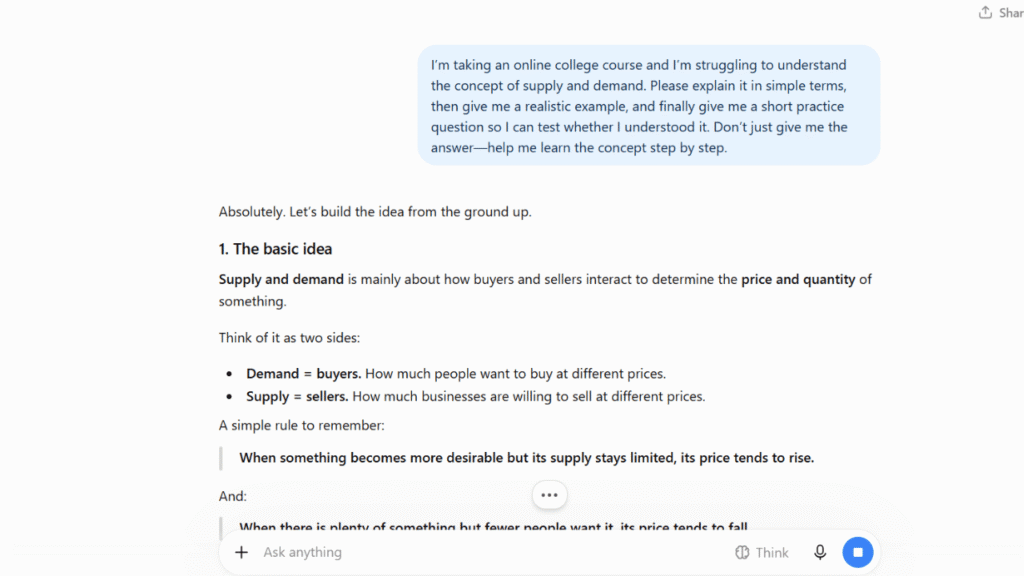
It can be used as a study assistant for explanations, brainstorming, writing practice, research, file analysis, data analysis, and question generation.
The free plan currently includes web search, limited file uploads, data analysis, image generation, voice, and other capabilities, while ChatGPT Plus costs $20 per month and provides higher limits and expanded access to advanced features.
Best Online-Learning Uses
A student can upload course material and ask ChatGPT to:
- Explain a difficult section
- Summarize a chapter
- Create practice questions
- Compare two concepts
- Make a study outline
- Review an answer
- Identify gaps in understanding
- Create examples
- Help plan an assignment
Its flexibility is the main advantage.
Student Workflow
Suppose an economics student is confused about elasticity.
Instead of asking:
“Give me the answer to my homework.”
A better prompt is:
“Explain price elasticity with a simple example, then give me three practice questions without answers.”
The student attempts the questions first and asks for feedback afterward.
That turns AI into a practice partner rather than an answer machine.
Free Plan
ChatGPT has a free plan with limits on advanced tools. Plus is $20/month for higher limits and broader access.
Strengths
- Extremely flexible
- File uploads
- Web search
- Explanations
- Practice questions
- Writing assistance
- Voice interaction
- Broad academic usefulness
Limitations
ChatGPT can make factual mistakes.
Students should verify important academic claims, particularly when the answer affects an assignment, research project, or exam.
Best for: Students who want one general-purpose AI assistant for many parts of an online course.
Google Gemini
Google Gemini is particularly interesting for students who already use Google services.
Its ecosystem can connect learning assistance with Google Workspace, and Google is also rolling out study-focused features such as study notebooks.
Study notebooks are designed to turn class material and learning goals into interactive study experiences, including diagnostic questions, lessons, quizzes, and progress-based learning.
Where Gemini Fits
Gemini can help with:
- Concept explanations
- Brainstorming
- Research
- Writing
- Document analysis
- Study questions
- Interactive learning
- Google Workspace workflows
Students using Google Drive, Docs, and other Google tools may find this convenient.
Study Notebooks
The newer study-notebook experience is especially relevant to online students.
A student can provide learning material and a goal, then work through an interactive study experience rather than simply asking isolated questions.
This is closer to a learning workflow than a normal chatbot conversation.
Free Availability
Gemini has free access, while Google’s paid AI plans provide expanded access to premium models and features.
For educational organizations, Google also offers AI features through Workspace for Education and Google AI Pro for Education.
Strengths
- Strong Google ecosystem
- Study-focused features
- Research capabilities
- Document support
- Interactive learning
- Useful for students already using Google Workspace
Limitations
Feature availability and usage limits vary by account type, age, location, and Google Workspace license.
Best for: Students who want AI learning assistance integrated with Google’s ecosystem.
NotebookLM
NotebookLM is one of the most interesting choices for students because it is designed around your sources.
Instead of asking a general chatbot about a subject and hoping it uses the right material, you can create a notebook containing course documents, PDFs, websites, YouTube videos, audio files, Google Docs, slides, and other supported sources.
You can then ask questions about those materials.
Why This Matters for Online Courses
Imagine an online biology course with:
- Four lecture PDFs
- Two textbook chapters
- Three lecture recordings
- A study guide
- Professor-provided notes
Put the material into a NotebookLM notebook.
You can then ask:
“What are the five concepts the instructor emphasizes most?”
Or:
“Create ten practice questions based only on these materials.”
That makes NotebookLM particularly useful when the course itself is the main source of truth.
Study Features
NotebookLM can create:
- Study guides
- Flashcards
- Quizzes
- Reports
- Mind maps
- Audio Overviews
- Video Overviews
- Source-grounded answers
It also provides citations to the supplied sources when responding.
Students who want to turn lecture material into organized notes can pair it with Best AI Note-Taking Apps for Students for a broader note-taking workflow.
Free Availability
NotebookLM provides a free level with usage limits. Current standard limits include up to 100 notebooks, 50 sources per notebook, 50 chat queries per day, and 3 Audio Overviews per day.
Higher limits are available through eligible Google plans and education editions.
Strengths
- Grounded in student-provided sources
- Excellent for course materials
- PDF support
- YouTube and audio support
- Quizzes
- Flashcards
- Audio Overviews
- Source citations
Limitations
NotebookLM is less useful when you want unrestricted general conversation unrelated to your uploaded material.
Its strength is source-based learning.
Best for: Students who want to study directly from lectures, PDFs, notes, slides, and other course materials.
Claude
Claude is another general-purpose AI assistant that can be useful for online learning, particularly when students work with substantial documents.
It supports document analysis and can work with PDFs, DOCX, CSV, TXT, HTML, EPUB, and other file types.
Strong Use Cases
Claude can help students:
- Explain readings
- Analyze documents
- Compare sources
- Review essays
- Brainstorm projects
- Organize information
- Generate practice questions
- Work through complicated concepts
Its project functionality can also help students keep related conversations and documents organized.
PDF Analysis
Claude can analyze both text and visual elements in supported PDFs with compatible models, which is useful for documents containing charts, images, and diagrams.
For very long PDFs, processing capabilities depend on the model and document size.
Pricing
Claude has a free plan.
Claude Pro is $20/month in the United States, with an annual option available at a discount.
Strengths
- Strong document analysis
- Good for long-form writing
- Useful explanations
- Projects
- PDF understanding
- Research assistance
Limitations
Usage limits apply, particularly on free access.
Students should also verify important information rather than assuming a polished response is automatically correct.
Best for: Students working heavily with documents, writing, research, and detailed explanations.
Khanmigo
Khanmigo is different from general AI chatbots because its core purpose is educational guidance.
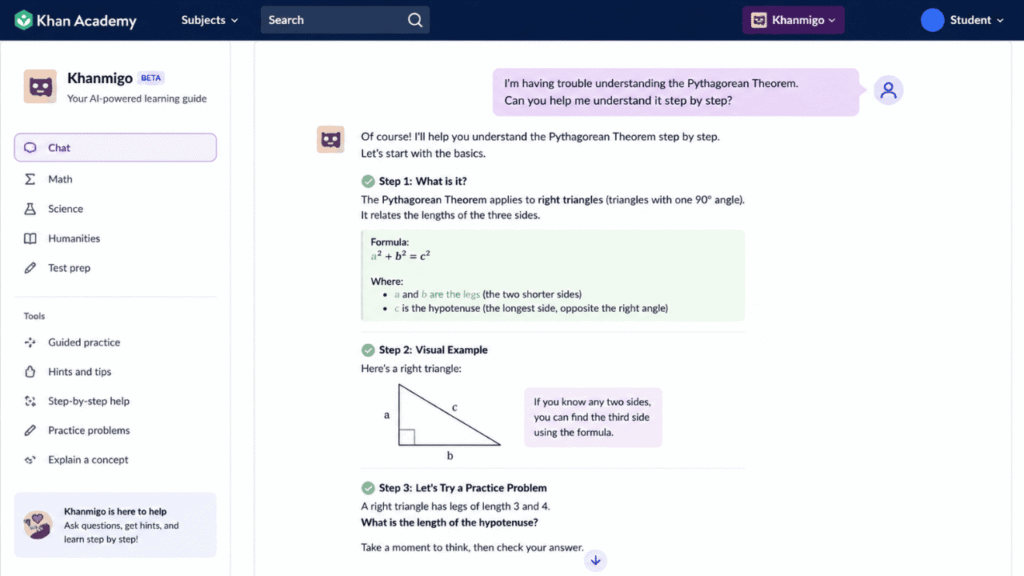
Instead of simply giving students an answer, Khanmigo is designed to guide learners through problems.
That distinction matters.
Guided Learning
Suppose a student asks for help solving an algebra problem.
A useful tutor should not simply return the final number.
It should help the student identify:
- What information is provided
- What needs to be found
- Which formula or concept applies
- What step comes next
- Why that step works
That approach is much closer to tutoring.
Khan Academy Integration
Khanmigo is particularly relevant for students using Khan Academy’s learning content, including areas such as mathematics, science, reading, and test preparation.
Pricing
Individual Khanmigo Learner access is currently $4/month in the United States.
Students under 18 have additional access restrictions. Khanmigo availability can also come through participating school or district programs.
Strengths
- Education-focused
- Guided learning
- Useful for practice
- Connected to Khan Academy learning content
- Strong choice for structured tutoring
Limitations
It is not intended to replace every study tool.
Students doing extensive research, document analysis, or general writing may need another platform alongside it.
Best for: Students who want an AI tutor rather than a general chatbot.
Quizlet
Quizlet is built around studying and active recall.
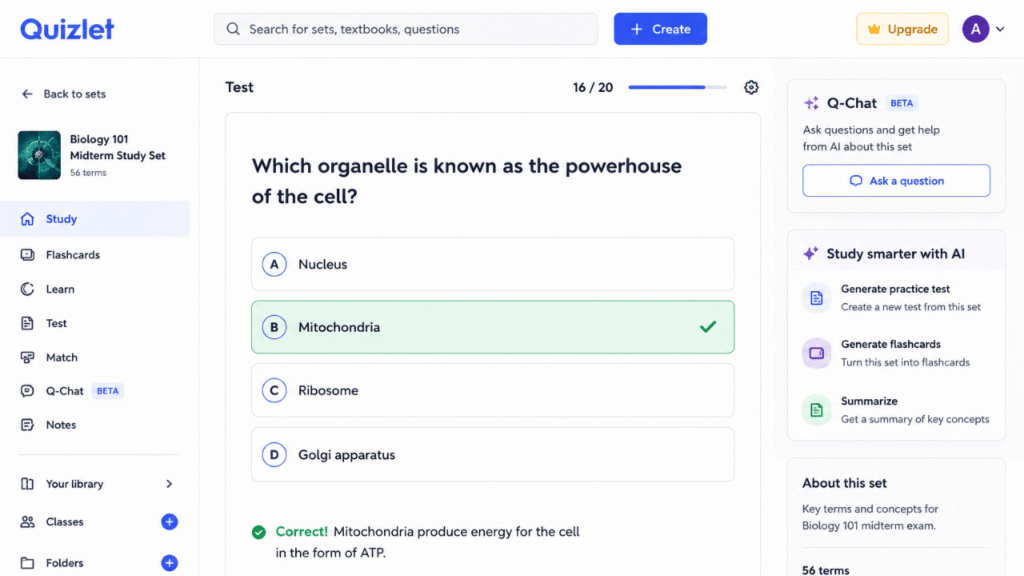
Its AI tools can turn notes, slides, and PDFs into study materials such as structured guides, flashcards, and practice tests.
Why It Works Well for Online Students
One of the biggest problems with online learning is passive studying.
A student watches a lecture, reads the notes, and feels familiar with the material.
That feeling can be misleading.
Practice questions expose what the student actually remembers.
Quizlet’s AI features can generate practice tests and study guides from uploaded material, making it easier to move from reading to retrieval practice.
Free Availability
Quizlet offers free access with some AI capabilities.
Paid Quizlet Plus plans currently start at $2.99/month when billed annually, while Quizlet Plus Unlimited is listed at $3.75/month billed annually.
The included features and usage limits differ between plans.
Strengths
- Flashcards
- Practice tests
- Study guides
- Active recall
- Easy interface
- Useful for exam preparation
Limitations
Some advanced study functionality is limited by subscription level.
Students also need to check generated material for errors instead of assuming every AI-generated question is perfect.
Best for: Students preparing for quizzes and exams who want AI-generated practice material.
Perplexity
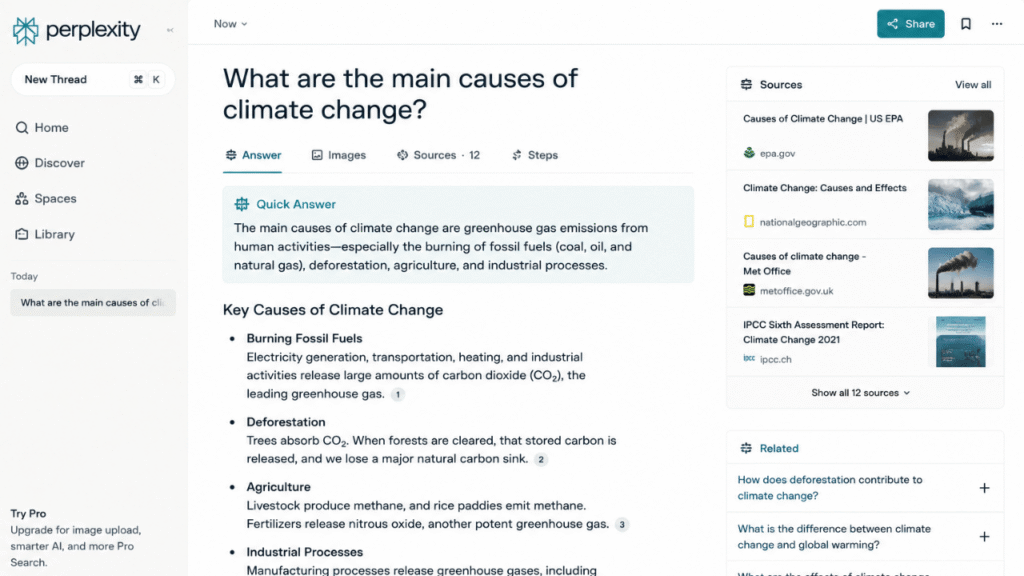
Perplexity is best understood as an AI-powered research and search tool rather than a traditional tutoring platform.
That makes it particularly useful when an online course requires research beyond the provided materials.
Research Workflow
A student working on a history assignment might ask for:
- Primary sources
- Recent academic discussion
- Background information
- Different viewpoints
- Definitions
- Relevant organizations or events
Perplexity provides answers with citations and links to sources, allowing students to investigate further.
Free Plan
Perplexity has a free Standard plan with basic search and limited access to advanced search features.
Its Education Pro plan is currently $10/month for verified students and educators.
Perplexity Pro is available at a higher price for users who need more advanced research capabilities.
Strengths
- Web research
- Source-backed answers
- Research workflows
- File uploads
- Follow-up questions
- Useful for finding information quickly
Limitations
Students should still open the cited sources.
A citation attached to an AI answer does not automatically mean the source supports every sentence in that answer.
Best for: Online students who need research help beyond their course materials.
Learning Task Comparison
| Task | ChatGPT | Gemini | NotebookLM | Claude | Khanmigo | Quizlet | Perplexity |
|---|---|---|---|---|---|---|---|
| Explain concepts | Excellent | Excellent | Excellent from sources | Excellent | Excellent | Good | Good |
| Analyze course PDFs | Yes | Yes | Excellent | Excellent | Limited | Yes | Yes |
| Generate quizzes | Yes | Yes | Excellent | Yes | Yes | Excellent | Yes |
| Flashcards | Yes | Yes | Excellent | Yes | Yes | Excellent | Limited |
| Research | Excellent | Excellent | Source-based | Excellent | Limited | Limited | Excellent |
| Writing help | Excellent | Excellent | Good | Excellent | Focused | Good | Good |
| Guided tutoring | Good | Excellent | Good | Good | Excellent | Moderate | Moderate |
| Course-source grounding | Depends on prompt | Depends on setup | Excellent | Depends on prompt | Course-focused | Uploaded materials | Web sources |
A Complete Online-Course Workflow
The Best AI Tools for Online Learning become much more useful when you connect them to a real study process.
Try this workflow:
Watch lecture
↓
Capture notes
↓
Summarize difficult sections
↓
Ask questions
↓
Create practice questions
↓
Review with flashcards
↓
Complete assignment
↓
Prepare for quiz
Stage 1: Watch the Lecture
Do not try to outsource the lecture.
Watch it normally.
Write down confusing ideas and important concepts.
Stage 2: Capture Notes
Use your preferred note-taking system.
If you have many lectures, you can use AI to help organize the raw notes later.
Stage 3: Summarize Difficult Sections
Upload the relevant material to NotebookLM, ChatGPT, Gemini, or Claude.
Ask for a summary focused on the concepts you struggled with.
Stage 4: Ask Questions
Do not stop at a summary.
Ask:
- Why does this happen?
- What is the difference between X and Y?
- Give me a practical example.
- What would change if this assumption were removed?
Stage 5: Generate Practice Questions
Now test yourself.
Ask the AI to create questions without showing the answers immediately.
Stage 6: Use Flashcards
Turn definitions, formulas, dates, terminology, and key concepts into flashcards.
For a dedicated flashcard workflow, Best AI Flashcard Generators for Students can help you choose tools specifically designed for this stage.
Stage 7: Complete the Assignment
Use AI for clarification, brainstorming, feedback, and research support where your course rules allow it.
Do the actual intellectual work yourself.
Stage 8: Prepare for the Quiz
Use practice questions rather than rereading everything.
The goal is to discover what you cannot recall.
AI Tutor vs. Human Instructor
AI tutors have a major advantage: availability.
You can ask the same question five times without worrying about bothering anyone.
But a human instructor still provides things AI cannot reliably provide.
| AI Tutor | Human Instructor |
|---|---|
| Immediate explanations | Course-specific guidance |
| Unlimited repetition | Human judgment |
| Practice questions | Detailed grading |
| Different explanations | Mentorship |
| Examples on demand | Understanding of class expectations |
| Basic feedback | Academic decisions |
| Available outside class hours | Personal knowledge of student progress |
A student should use both where possible.
AI is excellent for repetition and low-stakes practice.
Teachers remain essential for course-specific feedback, difficult academic decisions, grading, mentorship, and situations where context matters.
How to Use AI Without Passively Learning
The biggest risk with online AI learning is not always incorrect information.
It is false confidence.
A student reads an excellent explanation and thinks:
“I understand this.”
Then they try a problem without AI and discover they cannot solve it.
Use AI in ways that force you to think.
Ask for Hints
Instead of:
“Solve this problem.”
Try:
“Give me one hint. Don’t show the solution.”
Explain It Back
After learning a concept, tell the AI:
“I’m going to explain this in my own words. Tell me where my explanation is wrong.”
That creates a useful feedback loop.
Request Practice
Ask for questions that gradually increase in difficulty.
Answer them without assistance.
Hide the Answer
Don’t ask for questions and answers in the same response if you know you’ll look at the solution immediately.
Check the Course Material
If your professor teaches a concept differently from a general AI explanation, the course material takes priority for that class.
Free vs. Paid AI Learning Tools
| Tool | Free Access | Paid Option | Who Should Consider Paying? |
|---|---|---|---|
| ChatGPT | Yes | Plus $20/month | Heavy users needing higher limits |
| Gemini | Yes | Google AI plans | Students wanting expanded Google AI access |
| NotebookLM | Yes | Higher-limit Google plans | Students with heavy source-based study |
| Claude | Yes | Pro $20/month | Frequent document and writing users |
| Khanmigo | Limited individual availability | $4/month in U.S. | Students wanting dedicated tutoring |
| Quizlet | Yes | Plus from $2.99/month annually | Students using advanced practice features |
| Perplexity | Yes | Education Pro $10/month | Research-heavy students |
A free plan is often enough to determine whether a tool actually improves your study routine.
Don’t subscribe to five AI products because each one looks useful.
Start with the tool that solves your biggest problem.
Best Options by Online Student Type
College Students
Best choices: ChatGPT, NotebookLM, and Perplexity
Together, they cover explanations, course materials, research, and study preparation.
High School Students
Best choices: Khanmigo, Quizlet, and Gemini
These tools are useful for guided practice, revision, and explanations.
Age and account restrictions can apply to AI products, so students and parents should check current eligibility before signing up.
Adult Learners
Best choices: ChatGPT, Claude, and NotebookLM
Adult learners often need flexibility because they may study around work and family responsibilities.
These tools can help process course material when a teacher isn’t immediately available.
Self-Paced Learners
Best choices: NotebookLM and Khanmigo
Self-paced students benefit from guided explanations and source-based study.
Students Taking Multiple Online Courses
Best choices: NotebookLM plus a productivity or planning system
Create separate notebooks or study spaces for different courses rather than mixing everything into one conversation.
If you need help organizing several course deadlines, our Best AI Study Planner Apps for Students guide covers tools built specifically around planning and scheduling.
Students on a Budget
Best choices: NotebookLM, ChatGPT Free, Gemini Free, Quizlet Free, and Perplexity Free
You can build a useful AI study setup without paying for multiple subscriptions.
Exam-Focused Students
Best choices: NotebookLM and Quizlet
Use NotebookLM to understand course material and generate study resources, then use Quizlet for repeated practice.
A 7-Day Online Learning Experiment
Instead of subscribing to several apps immediately, test AI for one week.
Day 1 — Summarize
Choose one lecture or chapter.
Ask AI to produce a concise summary.
Then compare the summary with the original material.
Day 2 — Explain
Choose the hardest concept from the course.
Ask AI to explain it at three levels:
- Beginner
- College student
- Technical
See which explanation actually helps you understand it.
Day 3 — Practice Questions
Generate 10 questions.
Answer them without looking at the answers.
Mark the questions you missed.
Day 4 — Flashcards
Turn the concepts you missed into flashcards.
Review them later rather than immediately rereading the chapter.
Day 5 — Research
Use an AI research tool to investigate one topic related to the course.
Open the original sources and check the claims.
Day 6 — Review Mistakes
Give the AI your incorrect answers and ask it to explain why they were wrong.
Don’t ask it to simply provide the correct answers.
Day 7 — Test Yourself
Take a short practice test without AI.
Then compare your performance with Day 3.
If your understanding improved, keep the workflow.
If it didn’t, change the method rather than simply adding another AI tool.
Common Mistakes
Copying AI Answers
Copying an answer may finish the assignment, but it doesn’t teach you the concept.
Use AI for explanations and practice instead.
Skipping the Original Course Material
A summary is not a replacement for the assigned lecture or reading.
Professors may emphasize details that an AI summary leaves out.
Trusting Every Explanation
AI can confidently produce incorrect information.
Verify important facts.
Using AI for Every Task
If AI generates every question, explanation, outline, and answer, you may stop practicing the skills the course is supposed to teach.
Not Checking Sources
For research assignments, open the original sources.
Don’t rely solely on an AI-generated summary.
Overusing Summaries
If every chapter becomes a five-line summary, you may lose the details needed for an exam.
Use summaries to orient yourself, then study the important sections in depth.
Treating AI as a Replacement for Studying
AI can reduce friction.
It cannot create understanding for you.
Frequently Asked Questions
What are the Best AI Tools for Online Learning?
The best choice depends on the task. NotebookLM is excellent for studying from your own course sources, Khanmigo is designed around guided tutoring, Quizlet is strong for active recall, Perplexity is useful for research, and ChatGPT, Gemini, and Claude are flexible general-purpose study assistants.
Can AI replace an online course instructor?
No. AI can provide explanations and practice at any time, but instructors understand course requirements, grading standards, student progress, and institutional expectations in ways a general AI system cannot reliably reproduce.
Which AI tool is best for online lectures?
NotebookLM is particularly useful when you can provide lecture recordings, notes, slides, or other course materials. It can then help summarize and question those sources.
Can AI turn lecture notes into quizzes?
Yes. Tools such as NotebookLM and Quizlet can generate quizzes from supplied study material. Students should review generated questions for accuracy and completeness.
Can AI help me study from a PDF?
Yes. ChatGPT, Gemini, Claude, NotebookLM, and other tools support document-based workflows. NotebookLM is particularly useful when the PDF is part of a larger collection of course sources.
Is NotebookLM free for students?
NotebookLM has a free level with usage limits. Students can use it without subscribing, while eligible Google plans provide higher limits and additional capabilities.
Is Khanmigo free for students?
Individual learner access is currently a paid subscription in the United States. Khanmigo can also be provided through participating school and district programs, so availability depends on how the student accesses Khan Academy.
Can ChatGPT help with online classes?
Yes. Students can use ChatGPT for explanations, practice questions, brainstorming, document analysis, research assistance, writing feedback, and other study tasks, subject to their course’s AI-use rules.
Which AI tool is best for research in an online course?
Perplexity is particularly useful when you need to search beyond the course materials and inspect the sources behind an answer. NotebookLM is better when your research is already contained in a specific collection of documents.
Can AI create flashcards from course material?
Yes. NotebookLM and Quizlet can generate flashcards from supplied material. Other general AI assistants can also create flashcards when given notes or documents.
Should I upload my entire online course to an AI tool?
Not automatically. Start with the material you actually need, and check whether you have permission to upload it. Course content may be copyrighted or subject to institutional rules.
Can AI summarize a video lecture?
Some tools can work with video or its transcript. NotebookLM supports YouTube sources and other supported media, while other AI tools may require a transcript or uploaded file.
Is AI good for online exam preparation?
It can be useful for generating practice questions, explaining difficult concepts, reviewing mistakes, and organizing revision. Students should still follow the actual course material and exam requirements.
Can AI help students who learn at different speeds?
Yes. One advantage of conversational AI is that students can ask for the same explanation in different ways and repeat practice without waiting for a class session.
How can I avoid becoming dependent on AI?
Try solving problems before asking AI for help, request hints instead of answers, explain concepts in your own words, and periodically study without AI. Your ability to perform independently is the real test.
Final Recommendations
There isn’t one tool that deserves to be called the universal winner.
Choose NotebookLM if most of your online learning revolves around lecture notes, PDFs, slides, recordings, and other course materials. Its source-grounded approach makes it particularly useful for studying from a defined set of materials.
Choose Khanmigo if your biggest need is guided tutoring. It is designed to help students work through learning problems instead of simply handing over answers.
Choose Quizlet if your main problem is remembering what you’ve already learned. Its AI-generated study guides, flashcards, and practice tests are built around active recall.
Choose Perplexity when an online course requires research beyond the assigned materials. Its search and source-focused workflow makes it useful for investigating unfamiliar topics.
Choose ChatGPT if you want the broadest general-purpose study assistant. It can move between explanations, documents, research, writing, practice questions, and brainstorming without requiring a separate tool for every task.
Choose Gemini if you already work heavily inside Google’s ecosystem or want newer study-focused features such as interactive study notebooks.
Choose Claude if your online coursework involves substantial document analysis, long-form writing, or detailed explanations.
The smartest setup is usually smaller than students expect. You don’t need seven subscriptions. Start with one tool that addresses your biggest problem, use it for a week, and measure whether you actually learn more or simply finish tasks faster.
That distinction matters. The Best AI Tools for Online Learning should make studying clearer and more active—not make it possible to avoid studying altogether.